@sunatomo さん こんにちは
dashboardでグラフは出ませんがIP Address Device Formatの表示ができました。メニューにdashfboard とsettingしかありません。90-pluginsを追加したいのですがどのようにすればできますか。
-
-
@おやじん さん
smpd か ArchLinuxAoE のイメージから複写してくださいというのはちょっと酷なので、
私の環境からプラグインと ympd 向けの他のシェルスクリプトなどもアーカイブ化したファイルを添付します。
ympd_event.sh なども同梱しました。解凍して中身を見るとわかりますが、install.sh というインストーラを付けていますので
これでやってみてください。書いている途中に気づきましたが、このインストーラ 事前に /opt/plugins というプラグインディレクトリを作っておかないとうまく動きません。
-
@sunatomo さん ありがとうございます。
どこから手を付けてよいか考えあぐねていました。さっそくinstall.shを実行しましたがなかなかです。pluginsのリンクはattachとdetachにできるのでは思いまして、install.shの45行を ln -s ../90-plugins ./に、63行を ln -s ../$dir ./に替えて実行し、ympdのrestartをしましたところympd_event.shの30行で /usr/local/bin/ympd_event.sh: line 30: jq: command not found:と cat: write error: Broken pipe が出てympd_event.shが実行できません。iqコマンドは何に変えたらよろしいでしょうか。 -
-
-
@おやじん さん
ここまで来たらかなりゴールは近いかと思います。
/opt/plugins/detach と /opt/plugins/attach で ls コマンドを実行し、 /opt/plugins/ 以下の各ディレクトリに対して シンボリックリンクが貼られているかを確認してください。
(すいません。install.sh でシンボリックリンクを一括生成するように作っているはずなのですが、うまく行っていないようです)シンボリックリンクは detach ・ attach どちらかに存在する必要があります(両方ある場合はNG+どちらもない場合もNG)。
ちなみに私の環境になります(日付は無視してください)。
/opt/plugins/attachlrwxrwxrwx 1 root root 9 3月 14 2020 02-net -> ../02-net lrwxrwxrwx 1 root root 12 3月 14 2020 03-search -> ../03-search lrwxrwxrwx 1 root root 12 6月 25 2020 04-webui -> ../04-webui/ lrwxrwxrwx 1 root root 12 6月 25 2020 05-stats -> ../05-stats/ lrwxrwxrwx 1 root root 14 11月 13 2021 06-no_image -> ../06-no_image lrwxrwxrwx 1 root root 9 12月 26 2019 10-mpd -> ../10-mpd lrwxrwxrwx 1 root root 20 12月 29 2019 11-update_library -> ../11-update_library lrwxrwxrwx 1 root root 16 12月 29 2019 12-save_queue -> ../12-save_queue lrwxrwxrwx 1 root root 16 12月 29 2019 13-add_stream -> ../13-add_stream lrwxrwxrwx 1 root root 12 4月 22 2020 14-upload -> ../14-upload lrwxrwxrwx 1 root root 12 3月 21 2021 15-lastfm -> ../15-lastfm lrwxrwxrwx 1 root root 11 3月 14 2020 20-color -> ../20-color lrwxrwxrwx 1 root root 13 12月 29 2019 40-spotify -> ../40-spotify lrwxrwxrwx 1 root root 16 3月 14 2020 81-disk_usage -> ../81-disk_usage lrwxrwxrwx 1 root root 9 3月 21 2021 82-aoe -> ../82-aoe lrwxrwxrwx 1 root root 15 2月 18 2023 83-key_help -> ../83-key_help/ lrwxrwxrwx 1 root root 21 4月 29 2023 84-radiko_youtube -> ../84-radiko_youtube/ lrwxrwxrwx 1 root root 13 12月 29 2019 90-plugins -> ../90-plugins lrwxrwxrwx 1 root root 13 12月 29 2019 91-support -> ../91-support lrwxrwxrwx 1 root root 12 12月 29 2019 92-reboot -> ../92-reboot lrwxrwxrwx 1 root root 14 12月 29 2019 93-shutdown -> ../93-shutdown/opt/plugins/detach
lrwxrwxrwx 1 root root 15 12月 29 2019 01-soundcard -> ../01-soundcard※プラグインのうち、soundcardは確かAoEの場合はNG
また、radiko-youtube は ffmpeg のインストール + yt-dlp が当該環境向けに存在するかによります。sunatomoさんにおんぶにだっこでメニューが表示できるところまで来ました。ありがとうございます。
いえいえ、正直実験台になって頂き本当に感謝しております。
ここで記載した貴重な経験がおそらく他の方の移植に役に立つと思います。
(正直 Windows 環境だけは動作は無理だと思っていますが、UNIX ライクで必要なパッケージがあれば大丈夫でしょう) -
-
@おやじん さん
2点ほど確認させてくだい。
1.シンボリックリンクの方法ですが、02-net を例にしますがcd /opt/plugins/detach ln -s ../02-net 02-netとなりますが、間違いありませんか?
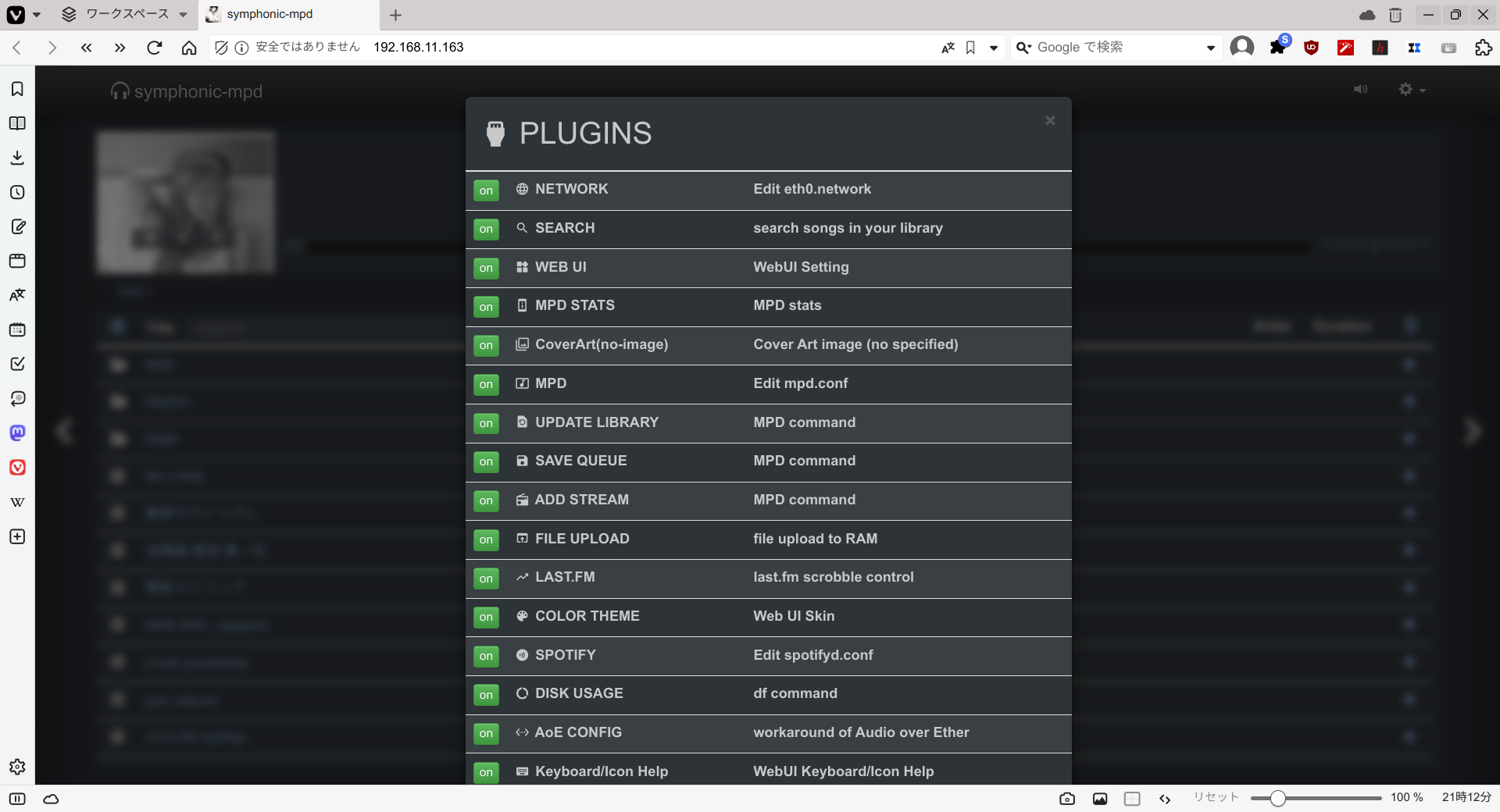
2.PLUGINS でシンボリックリンクを作成したプラグインが一覧に表示されていますか?
表示されていて、これを ON に切り替えた状態で歯車のメニューからご提示の例の通り SAVE QUEUE 等が表示されたとして、
/opt/plugins/12-save_queue の内部にform.html などはありますか?
また、run.sh の パーミッションは 755 でしょうか(実行権限あり)。 -
-
-
-
-
@sunatomo さん
ありがとうございます。ln -s /opt/plugins plugins の後メニューのPLUGINSでpluguinsの一覧が表示され、SAVE QUEUEでも設定画面が表示されました。嬉しくてメニューの入れ替えなどいじっていたらPLUGINSの表示が一覧からPLUGINS Information of Audio over Ether. になってしまいましたが、plugins を全部入れなおしたら元に戻りました。
lrwxrwxrwx 1 root root 11 Mar 20 15:00 04-webui -> ../04-webui
lrwxrwxrwx 1 root root 9 Mar 20 15:00 10-mpd -> ../10-mpd
lrwxrwxrwx 1 root root 20 Mar 20 19:56 11-update_library -> ../11-update_library
lrwxrwxrwx 1 root root 16 Mar 20 15:00 12-save_queue -> ../12-save_queue
lrwxrwxrwx 1 root root 16 Mar 21 12:39 13-add_stream -> ../13-add_stream
lrwxrwxrwx 1 root root 12 Mar 20 15:00 14-upload -> ../14-upload
lrwxrwxrwx 1 root root 9 Mar 20 15:00 82-aoe -> ../82-aoe
lrwxrwxrwx 1 root root 13 Mar 21 07:35 90-plugins -> ../90-plugins
lrwxrwxrwx 1 root root 12 Mar 20 15:00 92-reboot -> ../92-reboot
lrwxrwxrwx 1 root root 14 Mar 20 15:00 93-shutdown -> ../93-shutdown
[root@archlinux ~]# ls -l /opt/plugins/detach
total 0
lrwxrwxrwx 1 root root 15 Mar 20 15:00 01-soundcard -> ../01-soundcard
lrwxrwxrwx 1 root root 9 Mar 20 15:00 02-net -> ../02-net
lrwxrwxrwx 1 root root 12 Mar 20 15:00 03-search -> ../03-search
lrwxrwxrwx 1 root root 11 Mar 21 12:39 04-webui -> ../04-webui
lrwxrwxrwx 1 root root 11 Mar 20 15:00 05-stats -> ../05-stats
lrwxrwxrwx 1 root root 14 Mar 20 15:00 06-no_image -> ../06-no_image
lrwxrwxrwx 1 root root 9 Mar 21 12:39 10-mpd -> ../10-mpd
lrwxrwxrwx 1 root root 16 Mar 20 15:00 13-add_stream -> ../13-add_stream
lrwxrwxrwx 1 root root 12 Mar 20 15:00 15-lastfm -> ../15-lastfm
lrwxrwxrwx 1 root root 11 Mar 20 15:00 20-color -> ../20-color
lrwxrwxrwx 1 root root 13 Mar 20 15:00 40-spotify -> ../40-spotify
lrwxrwxrwx 1 root root 16 Mar 20 15:00 81-disk_usage -> ../81-disk_usage
lrwxrwxrwx 1 root root 14 Mar 20 15:00 83-key_help -> ../83-key_help
lrwxrwxrwx 1 root root 20 Mar 20 15:00 84-radiko_youtube -> ../84-radiko_youtube
lrwxrwxrwx 1 root root 13 Mar 20 15:00 91-support -> ../91-support
これを黒いバックのtxt画面で書き込むやり方がわかりません。もし分けないです。 -
-
-
-
@おやじん さん
現状の dashboard 向け Javascript ソースコードでは、
/RAM/.dashboard.json (webui 向けのURLでの表記。実ファイルでは /var/lib/mpd/music/RAM/.dashboard.json)
をダウンロードした時点で 当該ファイルに "Env" というキーの値に
"archlinux64" と返された場合は smpd で実施されているレイテンシグラフが揃うまでの待ち時間ををキャンセルするように設計されていました。
↑
当方で ArchLinuxAoE 向けにこのような処理を追加していたことをすっかり失念していました。当方で、ソースコードを修正したものを提供後に再コンパイルして頂くか、
/usr/local/bin/util-dashboard.sh の途中を以下の通り修正頂けると元に戻るかと思います(本来の環境ではありませんが、archlinux64だと判断させる)。echo "{" > $output # Current Environment (Arch Linux or smpd) #if [ "`uname -a | awk '{print $2}'`" = "archlinux64" ];then # CURRENT_ENV="archlinux64" #else # CURRENT_ENV="" #fi CURRENT_ENV="archlinux64" echo "\"Env\":\"${CURRENT_ENV}\"," >> $output -
-
@おやじん さん
一応念の為にご連絡ですが、
.dashboard.json は (表記的に)JSONファイルである必要があります。
ArchLinuxAoEでの出力例を表示します。{ "Env":"archlinux64", "IP Address":"169.254.148.130/16 192.168.11.163/24", "Model":"Raspberry Pi 3 Model B Rev 1.2", "Device":" AoE VSOUND", "Format":" ", "arm_freq":600000000, "core_freq":250000000, "Core Voltage":"1.2000V (over_voltage=0)", "Temperature":"34.3'C", "Alert":"⚡ Under Voltage" }キーと値の組み合わせが中古カッコに囲まれていないとJSONファイルとみなされません。
(これはJSONがJavascrptでいうオブジェクトと同じ書式であるため)
適当にググって見つけましたが、こちら
を参考にしてください。
なお、.dashboard.json では配列は使用していません。 -